
Now on the Mac App Store
New File Creator
Right-click. New file. Done.
The one thing macOS has always been missing — a right-click menu that lets you create a new file right where you need it. No duplicate-and-rename. No opening an app just to make a blank document. Just right-click any folder in Finder and pick a file type.
A small fix that changes how you work
Windows has had it for thirty years. On macOS, creating a new file in a specific folder means opening an app, saving it manually, then dragging it where it belongs — or duplicating an existing file and clearing its contents. Neither option is fast. Neither feels right.
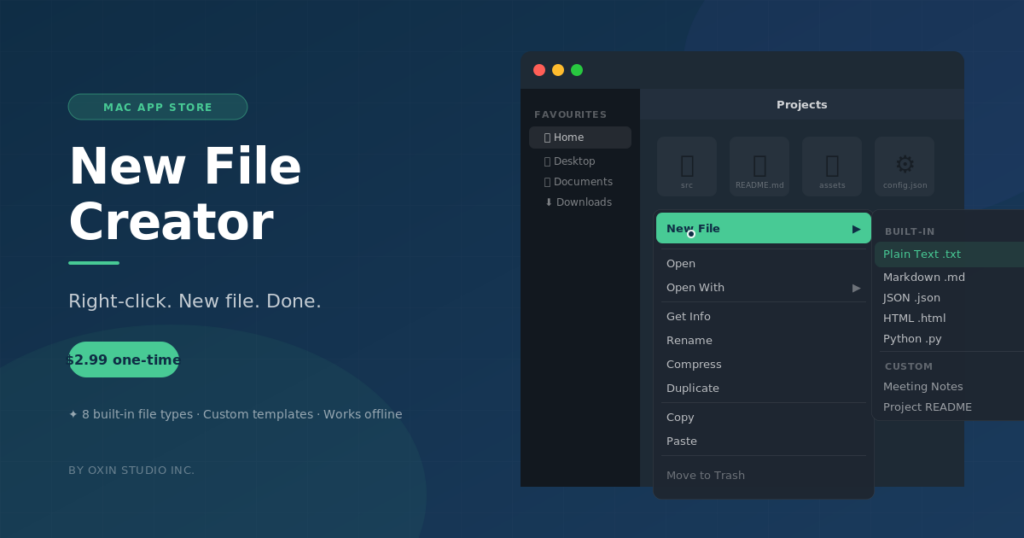
New File Creator adds a native-style submenu to Finder’s right-click menu. Right-click any folder, choose New File, pick a type — and the file appears instantly, already named and ready to rename. No app windows to dismiss. No save dialogs. The file is just there.
It works in any folder your Mac can reach: your home directory, Desktop, Documents, Downloads, and project folders wherever they live.
What you can do with New File Creator
Right-click anywhere in Finder
The submenu appears in Finder’s contextual menu for any folder. Right-click inside a folder or directly on a folder icon — either way, the option is there.
Eight built-in file types
Plain Text (.txt), Markdown (.md), JSON (.json), HTML (.html), CSS (.css), JavaScript (.js), Shell Script (.sh), and Python (.py) — the types developers and power users reach for most.
Custom templates
Create your own templates with the content and filename you want. A project README with your standard headings. A meeting notes file with today’s date. A config stub you start from every time.
Template variables
Use {{date}} and {{time}} in your template content or filename and New File Creator fills them in automatically at the moment the file is created.
Instant and offline
No cloud service. No account. No internet connection required. File creation happens entirely on your Mac, in the folder you chose, with no round trips anywhere.
One-time purchase
No subscription, no usage limits, no licence key to manage. Pay once on the Mac App Store and own it. Future updates are included.
How it works
1
Install from the Mac App Store.
New File Creator is a standard sandboxed Mac app. Download it, open it, and follow the three-step welcome screen. No terminal commands, no admin password, no restart.
2
Enable the Finder extension.
Go to System Settings → Privacy & Security → Extensions → Added Extensions and turn on New File Creator. This is what puts the option into Finder’s right-click menu.
3
Grant folder access.
Click “Grant Folder Access” in the app and select your Home folder. This is a one-time step that gives the app permission to create files anywhere inside your home directory.
4
Right-click and create.
Open Finder, right-click any folder, and choose New File. Pick a type from the submenu. The file is created in that folder and highlighted in Finder, ready to rename.
System requirements
Mac
Any Intel or Apple Silicon Mac
macOS
13 Ventura or later
Storage
Under 5 MB
Price
$2.99 — one-time purchase, no subscription
Built by Oxin Studio
New File Creator is made by Oxin Studio Inc., an independent software studio in Calgary, Alberta. We make small, focused Mac apps that do one thing well and stay out of your way. New File Creator is our answer to a gap in macOS that has existed far too long.
Common questions
Does it work with iCloud Desktop and Documents?
If iCloud Desktop & Documents sync is enabled, those folders are managed by iCloud and the Finder extension may not appear in them. The workaround is to navigate to your Home folder directly via Go → Home in Finder, then into the Desktop or Documents subfolder from there.
Does it work on external drives?
The current version covers your Home folder and all standard subfolders (Desktop, Documents, Downloads, Movies, Music, Pictures). External drives outside the Home directory are not supported in this release.
Do I need an internet connection?
Only to download the app from the Mac App Store. After that, New File Creator runs entirely offline. File creation never touches the network.
Can I add my own file types?
Yes. Open the app, go to Templates, and create a custom template with any file extension and content you want. Custom templates appear alongside the built-in types in the right-click menu.
Why does macOS ask about “accessing data from other apps”?
The first time you use the extension, macOS may ask for Automation permission. This is a standard macOS prompt for Finder extensions that open the main app to complete an action. Tap Allow once and you will not be asked again.
Is there a Windows version?
No. New File Creator is a macOS app built specifically around Finder and macOS APIs. A Windows equivalent already exists natively in that operating system.
Add the feature macOS forgot
A one-time purchase. No subscriptions. No accounts. Just right-click, pick a type, and get to work.
If you can, and only if you can
This app is free and stays free. If it saved you a subscription and you can spare something, it goes straight back into the next one.